Blame DNS                                                     michaelmcg
Report: RFC-0001                                       rfc.blame-dns.dev
Category: Informational                                   September 2026
Status: Final


                          RFC Report Generator
                          ====================


ABSTRACT

   RFC Report Generator is a free Windows app for writing incident and
   change reports as plain text, 72 columns wide, in the style of an
   IETF RFC. You fill in a form; it lays out the report as you type. It
   was probably DNS.


STATUS OF THIS MEMO

   This memo describes version 1.1.0. It is final, and distribution is
   unlimited.


1. DOWNLOAD

   Installer ........ RFC-Report-Generator-Setup.exe
   Portable ......... RFC-Report-Generator-Portable.exe
   Older versions ... See [RELEASES] below

   The installer adds a Start menu entry and opens .rfcreport files when
   you double-click them. The portable version runs from anywhere, with
   nothing to install.

   The app is not code-signed yet, so Windows SmartScreen may warn on
   first run. Choose More info, then Run anyway.


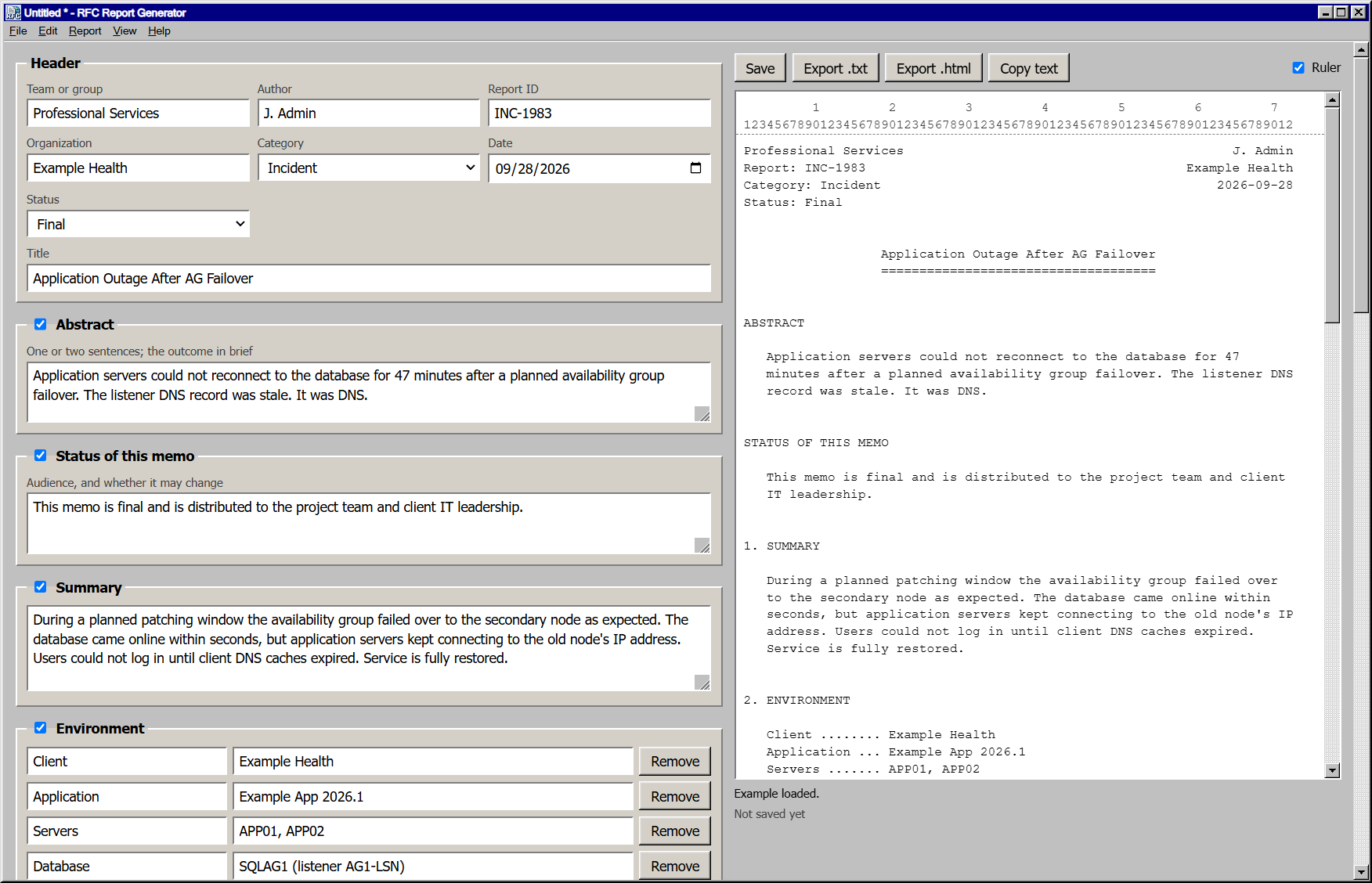
2. WHAT IT LOOKS LIKE
Figure 1: The app with the example report loaded.
3. FEATURES
- A live preview beside the form, with a column ruler and a warning
for any line over 72 characters.
- Header, abstract, summary, environment, timeline, impact, root
cause, resolution, action items, security considerations,
references and the author's address.
- Untick any section to leave it out. The rest renumber themselves.
- Sections for each category. A Change report starts with an
implementation plan, testing, a rollback plan and approvals. An
Upgrade report adds a table of versions.
- Commands and config are kept exactly as typed, never wrapped.
- Settings that prefill every new report: team, organization, author,
time zone, your own Status choices, and the sections for each
category.
- Spell check, with suggestions on right-click.
- Crash recovery: unsaved changes are kept, and offered back the next
time the app starts.
- The last eight reports at the bottom of the File menu.
- Export as .txt or .html, or copy the text straight into an email or
ticket.
- Reports save as .rfcreport files: plain JSON that diffs cleanly in
Git.
- A Windows 95 look, in light and dark themes.
4. REQUIREMENTS
System .... Windows 10 or 11, 64-bit
Network ... None. Reports stay on your PC.
5. SECURITY CONSIDERATIONS
The app makes no network requests. Its window runs sandboxed under a
strict content security policy, and only a small, checked bridge can
reach your files. Reports go only where you save or export them.
6. REFERENCES
[SOURCE] github.com/michaelmcg/RFC-Report-Generator
[RELEASES] github.com/michaelmcg/RFC-Report-Generator/releases
[LICENSE] MIT License, free to use and change
[RFC7322] RFC 7322, the RFC Style Guide
AUTHOR
michaelmcg
rfc.blame-dns.devgithub.com/michaelmcg
Informational [Page 1]